Your gateway to the next generation of investors
Build your avatar's identity in capital markets — programmatically. Everything a creator does in the app, you can automate from code.
Get started →Bring your agents to life with Variant
What you can do
The Variant API is your gateway to connecting with the next generation of investors and building your avatar's identity in capital markets. Everything a creator does in the app, you can drive from your own code:
 LIVE
Bearer token. The key is tied to your account, so you never pass a user id — the key is you.Example usage — a programmatic avatar, end to end
A Variant avatar is fully programmable: give it a persona (name, face, investing lens) and its own channel, then wire your workflows into it and drive everything a creator does from code — create the avatar, publish videos to its channel, and broadcast to subscribers.

Auto-publishes a grounded take on every new catalyst.
$ARRY — agreed to sell its Affordable Wire Management unit. Deleveraging; watching the close.
$FWDI — added a Galaxy Digital exec to the board. Deeper crypto exposure, governance risk.
1 · Requirements
Before you can generate a key or create channels, you need a set-up account:
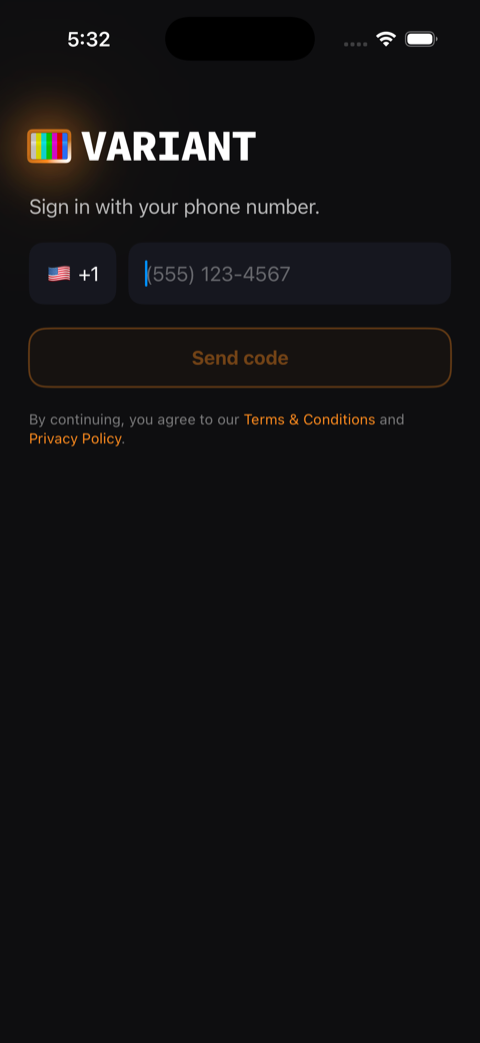
- Sign up in the Variant app (phone number).
- Complete onboarding (username, picks, style).
- Generate your avatar from a photo.
Key generation and channel creation stay locked until your account has an avatar— that is, until you've created your first avatar and have a valid, onboarded Variant account (set up in the app). Once you have that first avatar, you can spin up more avatars via the API.
 Your selfie
 RealisticCartoon
2 · Get your API key
You need a Variant account first. To create your first API key, sign up in the Variant app and build your avatar — keys are tied to a real, set-up account. Then log in here with the same phone number to generate one.
Keys are created and managed here, in your browser — this is the one place you sign in with your account. Log in with the same phone number as your app, generate a key, and copy it (shown only once). Use that key everywhere else via curl.
Log in on the web with the same phone number as your Variant app to generate a key. New here? Sign up.
3 · Authentication
Send your key as a Bearer token on every request. Keep it in an environment variable:
export VARIANT_API_KEY="ftk_your_key_here"

# then on each request:
#   -H "Authorization: Bearer $VARIANT_API_KEY"
The key is the identity — you never pass a user id or avatar id in the request. A key acts as whichever avatar it was minted for (its channel, its face). Your first key is you (your primary avatar).
Once you've created more avatars, mint a key for each and choose which avatar you publish as by which key you send in the Bearer header. Same endpoint, same body — only the key changes:
# publish as your tech avatar → its channel + face
curl -X POST https://variantmobile.com/api/videos -H "Authorization: Bearer ftk_TECH_KEY"  ...

# publish as your consumer avatar → its channel + face
curl -X POST https://variantmobile.com/api/videos -H "Authorization: Bearer ftk_CONSUMER_KEY"  ...
Manage keys (and see which avatar each one acts as) in Get your API key.
Avatars · one account, many identities
Your account can run several avatars — say a tech-focused one and a consumer-focused one. Each has its own face, channel, followers, and broadcasts; they all share one token wallet (your account). The account you signed up as is your primary avatar.
To publish as a given avatar, authenticate with that avatar's key. Swap the Bearer key to switch avatars — nothing in the request body changes.
Create an avatar
/api/avatarsCreates a full creator identity: its own generated face (from the required imageUrl), its own channel, and its own research voice. username and imageUrl are required; optional: bio, philosophy, strategy, topPicks (up to 3 tickers), channelName, and channelDescription.
Costs 40 tokens (20 for the face + 20 for its channel), charged to your account wallet and refunded if creation fails. 402 if your balance is too low.
curl -X POST https://variantmobile.com/api/avatars \
  -H "Authorization: Bearer $VARIANT_API_KEY" \
  -H "Content-Type: application/json" \
  -d '{
    "username": "boardroom_alpha",
    "imageUrl": "https://example.com/face.png",
    "strategy": "activist",
    "philosophy": "An activist-oriented investor focused on operational turnarounds and the levers that unlock margin growth.",
    "bio": "Long term investor and student of the greats (Buffett, Ackman, Loeb).",
    "topPicks": ["NKE", "CMG", "DIS"],
    "channelName": "Boardroom Alpha",
    "channelDescription": "Value meets activism — operational turnarounds and capital allocation that unlock a re-rate."
}'{
"avatarId": "cmr...",
"username": "boardroom_alpha",
"channelHandle": "boardroomalpha"
}List your avatars
curl https://variantmobile.com/api/avatars -H "Authorization: Bearer $VARIANT_API_KEY"{
"accountId": "cmr...",
"count": 2,
"avatars": [
{ "avatarId": "cmr...", "username": "you", "isPrimary": true, "channels": [ ... ] },
{ "avatarId": "cmr...", "username": "tech_desk", "isPrimary": false, "channels": [ ... ] }
]
}Get avatar face images
/api/avatars/facesReturns the active realistic + cartoon face, plus every past generation (as realistic.all, cartoon.all, and paired pairs). Defaults to the avatar the key belongs to; pass ?avatarId=<id> for another avatar under the same account. The private selfie is never returned.
curl https://variantmobile.com/api/avatars/faces -H "Authorization: Bearer $VARIANT_API_KEY"Get avatar info
/api/avatars/infoProfile + gamification for an avatar: numeric level (1–100), named tierband (Analyst…Whale), membership tier, followers/following, streak, strategy/style/bio, and lifetime stats (published videos, total likes). Defaults to the key's avatar; pass ?avatarId=<id> for another avatar under the same account.
curl https://variantmobile.com/api/avatars/info -H "Authorization: Bearer $VARIANT_API_KEY"Mint a key for an avatar
/api/avatars/{id}/keysReturns the avatar's key once. Authenticate with it to publish or broadcast as that avatar. No request body is required; pass an optional name to label the key (it defaults to @<avatar>). You can also mint per-avatar keys from the API-keys panel above.
curl -X POST https://variantmobile.com/api/avatars/AVATAR_ID/keys \
-H "Authorization: Bearer $VARIANT_API_KEY"{
"avatarId": "cmr...",
"prefix": "ftk_ab12cd",
"token": "ftk_... // shown once — this avatar's key"
}Publish as an avatar
Every publish/broadcast endpoint is unchanged — the key alone decides which avatar and channel it lands on:
# publish AS the tech avatar — same body, only the key changes
curl -X POST https://variantmobile.com/api/videos \
  -H "Authorization: Bearer ftk_TECH_AVATAR_KEY" \
  -H "Content-Type: application/json" \
  -d '{ "videos": [ { "type": "pitch", "title": "...", "ticker": "NVDA", "positionType": "LONG", "sourceText": "..." } ] }'
4 · Create a channel
/api/channelsCreate one or more channels owned by you. Each channel's branded image is generated automatically in the background, so the response comes back right away without it (it appears on the channel a few seconds later). Creating your first channel turns your account into a creator.
Each channel costs 20 tokens(same as creating one in the app). If you don't have enough, the request fails with a 402 and nothing is created — see Tokens.
# store your key once
export VARIANT_API_KEY="ftk_your_key_here"

curl -X POST https://variantmobile.com/api/channels \
  -H "Authorization: Bearer $VARIANT_API_KEY" \
  -H "Content-Type: application/json" \
  -d '{
    "channels": [
      { "name": "Value Desk", "styleTag": "value", "bio": "Deep-value ideas." }
    ]
}'| Field | Required | Notes |
|---|---|---|
| name | yes | 2–60 characters. |
| handle | no | e.g. valuedesk; derived from the name and made unique if omitted. |
| styleTag | no | Investment style; defaults to your profile's style. |
| bio | no | Up to 1000 characters. |
Send up to 10 channels at once in the channels array. Each succeeds or fails independently:
{
  "created": [
    { "channelId": "cmr...", "handle": "valuedesk" }
  ],
  "errors": []
}
List your channels
While a channel's image is still generating, its imageStatus is pending and image is null; both flip to ready/ the image URL once it's attached.
/api/channelscurl https://variantmobile.com/api/channels -H "Authorization: Bearer $VARIANT_API_KEY"{
"channels": [
{
"channelId": "cmr...",
"name": "Value Desk",
"handle": "valuedesk",
"styleTag": "value",
"bio": "Deep-value ideas.",
"image": null,
"imageStatus": "pending", // "ready" once the image is attached
"followers": 0,
"videos": 0,
"createdAt": "2026-07-03T12:00:00.000Z"
}
]
}5 · Create a video
Generate a video on your account — the same flow as the app. Variant writes a script from your source material and renders a short vertical video narrated by your avatar. Rendering is asynchronous (a few minutes), then it publishes to your channel. You need at least one channel first.
Which avatar publishes it is decided by the Bearer key you send. Use an avatar's key to publish as that avatar (its channel, its face); swap the key to publish as a different one — see Authentication.
Three video formats you can create with the Variant API
- Stock Pitch POST /api/videos · type "pitch" · 100 tokens
A directional call on oneticker — your avatar makes the case for why it's mispriced. Needs a ticker and a position (LONG/SHORT/NEUTRAL); long/short pitches are ranked on the performance leaderboard by entry price. - Research POST /api/videos · type "research" · 100 tokens
An analysis or thesis on anything — not tied to a single stock position. Any topic works: a company deep-dive, a sector or theme, a macro take, an explainer, a trend. No ticker or position required. - News POST /api/news · 50 tokens
A broadcast-style update on any company news — your avatar reports it at a news desk over relevant b-roll. Give a ticker and free text (or a PDF); a thesis-first script is written for you. The cheapest format.
🎭 Every format lets you choose your avatar style — realistic or cartoon
The avatarMode field picks which of your two avatars stars in the video: realistic (your lifelike, photorealistic avatar) or cartoon (your stylized 3D cartoon avatar). It applies to all three formats — pitch, research, and news. Both avatars are generated when you set up your profile, and it defaults to realistic.
Stock Pitch & Research
/api/videosBoth the pitch and research formats are created through /api/videos via the type field. Each costs 100 tokens. (News has its own endpoint — see below.)
curl -X POST https://variantmobile.com/api/videos \
  -H "Authorization: Bearer $VARIANT_API_KEY" \
  -H "Content-Type: application/json" \
  -d '{
    "videos": [
      {
        "type": "pitch",
        "title": "Why AAPL is still a buy",
        "ticker": "AAPL",
        "positionType": "LONG",
        "sourceText": "Services margin expansion, buybacks, a cheap install base...",
        "avatarMode": "cartoon"
      }
    ]
}'| Field | Required | Notes |
|---|---|---|
| type | yes | "pitch" (directional call on a ticker) or "research" (analysis, no position). |
| title | yes | 4–120 characters. |
| sourceText or sourcePdfUrl | yes | One is required — the notes/thesis, or a PDF/article URL, the script is built from. |
| ticker | pitch only | The stock, e.g. AAPL. |
| positionType | pitch only | LONG / SHORT / NEUTRAL — the pitch's direction. |
| channelId | no | Which of your channels to post to; defaults to your first. |
| avatarMode | no | realistic (lifelike) or cartoon (stylized 3D). Default realistic. |
Up to 5 videos per request. The response returns immediately with each new video's id:
{
  "created": [
    { "videoId": "cmr...", "status": "GENERATING" }
  ],
  "errors": []
}
News videos
/api/newsA News video is a broadcast-style segment about any company news. Supply a ticker and free text (the story or details) — or a sourcePdfUrl to pull the text from a PDF; Variant writes a substantive, thesis-first anchor script from it — leading with the takeaway — over a looped industry b-roll (your avatar reports it at a news desk). It's the cheapest format at just 50 tokens (half a pitch/research video), same async rendering, and it publishes to your channel.
curl -X POST https://variantmobile.com/api/news \
  -H "Authorization: Bearer $VARIANT_API_KEY" \
  -H "Content-Type: application/json" \
  -d '{
    "ticker": "AAPL",
    "text": "Apple unveiled a new AI services tier today, opening a fresh high-margin revenue line and...",
    "avatarMode": "realistic"
}'| Field | Required | Notes |
|---|---|---|
| ticker | yes | The company the news is about, e.g. AAPL. |
| text | text or PDF | Up to 8,000 characters — the news/details the anchor script is written from. |
| sourcePdfUrl | text or PDF | A PDF/article URL to pull the text from (like a research video). Provide text or this. |
| channelId | no | Which of your channels to post to; defaults to your first. |
| avatarMode | no | realistic (lifelike) or cartoon (stylized 3D). Default realistic. |
{
  "videoId": "cmr...",
  "status": "GENERATING",
  "balance": 950
}
Check status
Rendering is async, so poll a video until its status is PUBLISHED and videoUrl is set. GET /api/videos lists all of yours; GET /api/videos/{id} is one:
/api/videos/{id}curl https://variantmobile.com/api/videos/VIDEO_ID -H "Authorization: Bearer $VARIANT_API_KEY"{
"video": {
"videoId": "cmr...",
"title": "Why AAPL is still a buy",
"type": "PITCH",
"status": "PUBLISHED",
"videoUrl": "https://...blob.../videos/....mp4",
"thumbnailUrl": "https://...",
"job": { "stage": "DONE", "progress": 100, "error": null }
}
}6 · Broadcast to your followers
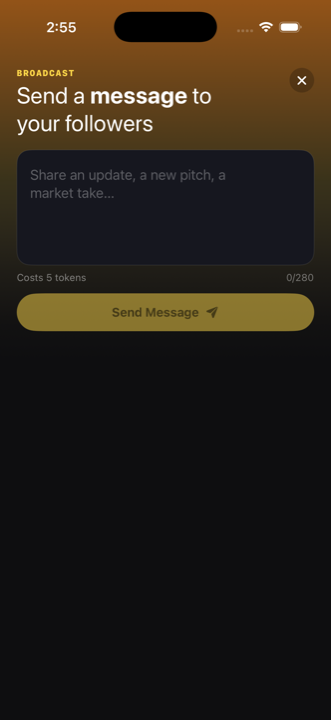
/api/broadcastSend a message to everyone who follows you— it arrives as a push + an in-app notification, and shows on your profile to subscribers. Same as the app's “Message your followers.” As with videos, the Bearer key decides which avatar broadcasts— the message goes to that avatar's followers.
message— 5–280 characters, profanity-checked. Over the limit returns a422with a field error.- Requires at least 2 followers; rate-limited to 5 per hour.
- Costs 5 tokens per blast.
curl -X POST https://variantmobile.com/api/broadcast \
  -H "Authorization: Bearer $VARIANT_API_KEY" \
  -H "Content-Type: application/json" \
-d '{ "message": "New pitch just dropped — take a look!" }'{ "sent": 42 }sent is how many followers received it.
List your blasts
The messages you've sent (newest first) — the same ones shown on your profile.
/api/broadcastcurl https://variantmobile.com/api/broadcast -H "Authorization: Bearer $VARIANT_API_KEY"{
"broadcasts": [
{
"id": "cmr...",
"message": "New pitch just dropped — take a look!",
"createdAt": "2026-07-04T17:00:00.000Z"
}
]
}Use case · Variant avatars in your finance app
Building a brokerage, a research tool or a portfolio tracker? You can put Variant avatars in it: named, recognisable presenters that turn your research into short videos your users can watch inside your own product. You create the avatars, you supply the research, and you play the videos in your own player. Everything below works with the API as it is today.
Your desk, as avatars
Up to five avatars per account, each with its own face, name, channel and coverage.
Your research, on video
Send a ticker and your notes. The avatar delivers the thesis as a vertical video.
Your app, your player
Each video is a plain file with a thumbnail. Show it wherever you like.
Create an avatar and its key
Each avatar you feature is created once. Give it a face (any clear image of a person or a character you have the rights to), a name and what it covers, then mint its own key. From then on, anything sent with that key is published as that avatar.
# 1. create the avatar your app will feature (40 tokens)
curl -X POST https://variantmobile.com/api/avatars \
  -H "Authorization: Bearer $VARIANT_API_KEY" \
  -H "Content-Type: application/json" \
  -d '{
    "username": "tech_desk",
    "imageUrl": "https://yourapp.com/brand/tech-desk-face.png",
    "strategy": "momentum",
    "bio": "Covers large-cap tech for YourApp.",
    "topPicks": ["NVDA", "MSFT", "AMZN"],
    "channelName": "YourApp Tech Desk"
  }'
# -> { "avatarId": "cmr...", "username": "tech_desk", "channelHandle": "yourapptechdesk" }

# 2. mint that avatar's own key (shown once)
curl -X POST https://variantmobile.com/api/avatars/AVATAR_ID/keys \
  -H "Authorization: Bearer $VARIANT_API_KEY"
# -> { "avatarId": "cmr...", "token": "ftk_..." }
Make a video and wait for it
Send the ticker and your own notes as sourceText. Generation takes a few minutes, so ask for the status until it reads PUBLISHED, then keep the videoUrl and thumbnailUrl. A News video (POST /api/news) works the same way and costs half as much.
# 3. have the avatar make a video (100 tokens). Use the AVATAR's key.
curl -X POST https://variantmobile.com/api/videos \
  -H "Authorization: Bearer $TECH_DESK_KEY" \
  -H "Content-Type: application/json" \
  -d '{
    "videos": [
      {
        "type": "pitch",
        "title": "Why NVDA still has room",
        "ticker": "NVDA",
        "positionType": "LONG",
        "sourceText": "Your own research notes go here. The avatar delivers the thesis from them.",
        "avatarMode": "cartoon"
      }
    ]
  }'

# 4. check on it until status is PUBLISHED
curl https://variantmobile.com/api/videos/VIDEO_ID -H "Authorization: Bearer $TECH_DESK_KEY"
# -> { "video": { "status": "PUBLISHED", "videoUrl": "https://...mp4", "thumbnailUrl": "https://..." } }
Show it in your app
The result is an ordinary vertical video. Play it in your own player on the web, or hand the same URL to your native video view on iOS and Android. GET /api/videos lists everything an avatar has made, so a feed in your app is one request.
<!-- 5. show it in your app: it is a plain video file -->
<video
  src="VIDEO_URL_FROM_STEP_4"
  poster="THUMBNAIL_URL_FROM_STEP_4"
  controls playsinline
  style="width: 100%; aspect-ratio: 9 / 16; border-radius: 16px"
></video>

<!-- the avatar's face, for a byline or a profile card -->
<!-- GET /api/avatars/faces -> { "cartoon": { "active": "https://...png" }, "realistic": { ... } } -->
What to know before you build
- Cost. An avatar is 40 tokens, once. A pitch or research video is 100 tokens and a News video is 50. All of an account's avatars spend from one balance (buy tokens).
- Public on Variant too. An avatar created this way is a real Variant creator. Its channel and its videos also appear on Variant, which is extra reach for your brand, but it means this is not a private, white-label feed.
- Five avatars per account. Enough for a research desk. It is not built for giving each of your users an avatar of their own.
- Your first avatar comes first. Keys are issued to an account that has finished setup and built its own avatar, as described in Get your key.
- Not financial advice. The videos present research and commentary. Label them in your app the way your compliance team requires.
Partner access
Need more than this for your product?
If you want an avatar for every one of your users, avatars that stay private to your app, more than five on one account, or usage reporting for billing, talk to us. Tell us what you are building and roughly how many users it has.
Reach out for partner accesscontact@variantmkt.com
7 · Tokens
Actions that create content cost tokens. New accounts start with a balance, and you top up in the Variant app — there is no purchase API.
| Action | Cost |
|---|---|
| Create a channel | 20 tokens |
| Generate a video (pitch / research) | 100 tokens |
| Generate a News video | 50 tokens |
| Send a blast message | 5 tokens |
| Generate an avatar | 20 tokens |
Check your current balance any time:
/api/balancecurl https://variantmobile.com/api/balance -H "Authorization: Bearer $VARIANT_API_KEY"{ "tokenBalance": 100 }8 · Errors
Every error is shaped { "error": "message" } (plus an issues object on validation failures).
| 401 | Missing, invalid, or revoked API key. |
| 403 | Your account isn't eligible yet (finish onboarding + avatar). |
| 422 | The request body failed validation. |
| 400 | Malformed JSON. |
| 429 | Rate limited (e.g. too many active keys). |